

Lesson 5 of 12 · Learn · 10 min
2.1 Invoices and quotes
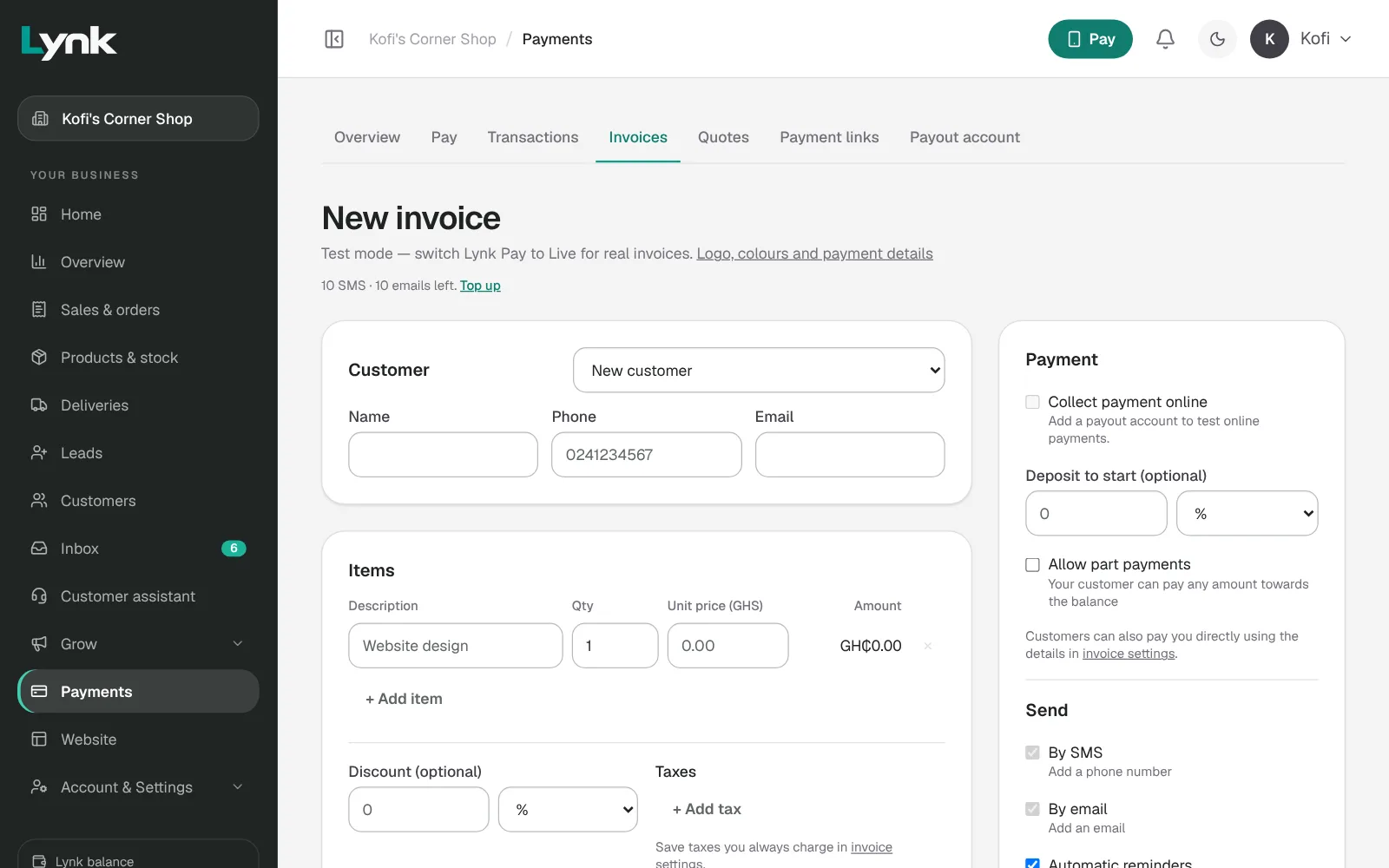
An invoice (Payments → Invoices → New invoice)
- Customer, then Items: description, quantity and amount for each line.
- Deposit to start (optional): the part paid first.
- Due date, and Collect payment online so the customer can pay by Mobile Money or card.
- Send it by SMS, email or both. Reminders go out around the due date until it's paid.
- On the invoice: Copy link, Send reminder, and Record payment when the customer pays you directly, in cash or to the business's MoMo.
Make invoices look like the business, once: Logo, colours and payment details. These show on every invoice, quote and PDF.
A quote (Payments → Quotes → New quote) agrees the price first. Fill it in like an invoice, add Payment terms once accepted, and Send quote. When the customer accepts online, it becomes an invoice. Agreed in person? Open it and click Convert to invoice.
For jobs (Course 1 Module 4): a quote when they ask the price, an invoice with a deposit before work starts, and the balance when it's done. Big jobs, like building or events, can be invoiced by stage. Switch on Remind customers about unpaid invoices in Grow → Automations.
Sign in to save your progress and earn the certificate.